How many hours a week does your HR team lose to manual work? Find out in a free survey (in Polish) →START >>>

HR analytics

Know what’s happening in your organization –⁠ no waiting for a report

HR analytics turns Worksmile data into a clear picture of the organization for HR, the management board and finance. Four thematic dashboards cover headcount and turnover, benefit budgets, HR processes –⁠ from requests and absences to surveys –⁠ and employee activity on the platform. The AI summary points out the most important trends and areas to watch, and answers questions about the data on the spot. No exports, no merging spreadsheets.

Worksmile on G2: 121 reviews, 4.5 rating
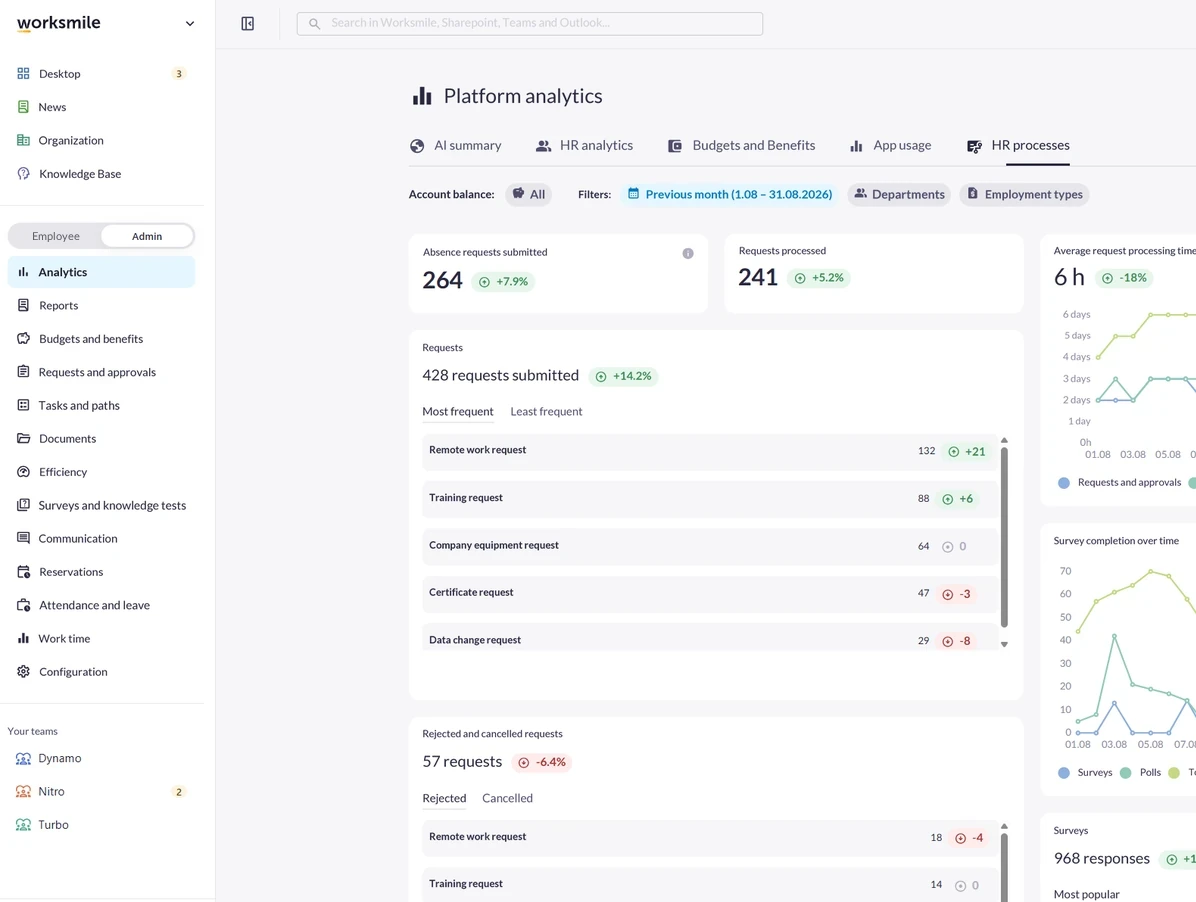
Platform analytics in Worksmile – HR processes tab with submitted and processed requests, processing time and rejected requests

Business results you will see quickly

We support HR and team managers while caring for the experience of 100% of employees –⁠ across the entire employee lifecycle

A management report without piecing data together

Metrics on people, budgets and processes are ready in the dashboard. Report data does not require exports from several systems.

Benefit budget under control

You can see how much money remains unused and which benefits employees actually choose.

Early signals of change in teams

Turnover, length of service and organizational structure are shown as trends, so you can react to changes earlier.

An answer instead of analyzing charts

The AI summary highlights the most important trends and what needs attention. The details come as an answer to a question asked in your own words.

Turnover and workforce structure

Headcount and turnover, always up to date

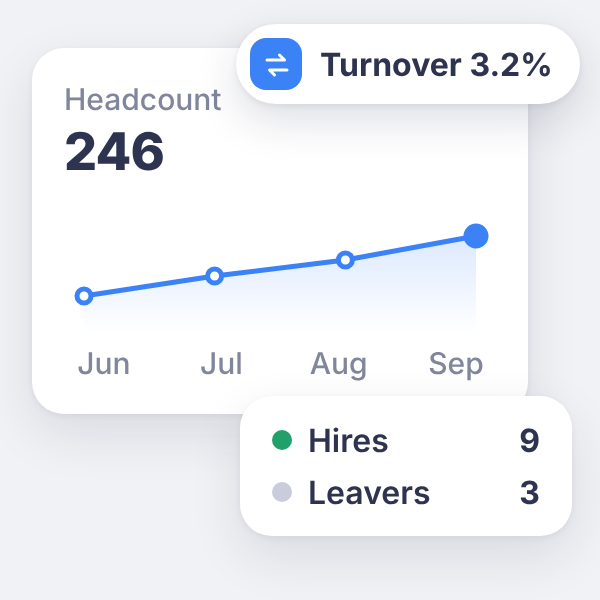
Headcount, employee turnover, length of service and organizational structure shown over time, without putting together HR reports in spreadsheets. HR sees which teams are growing and how turnover is changing, and has concrete data for conversations with managers and the management board.
See it in a demo: Headcount and turnover, always up to date
Headcount chart from June to September with 3.2% turnover and the number of hires and leavers

Benefits analytics

A full picture of benefit spending

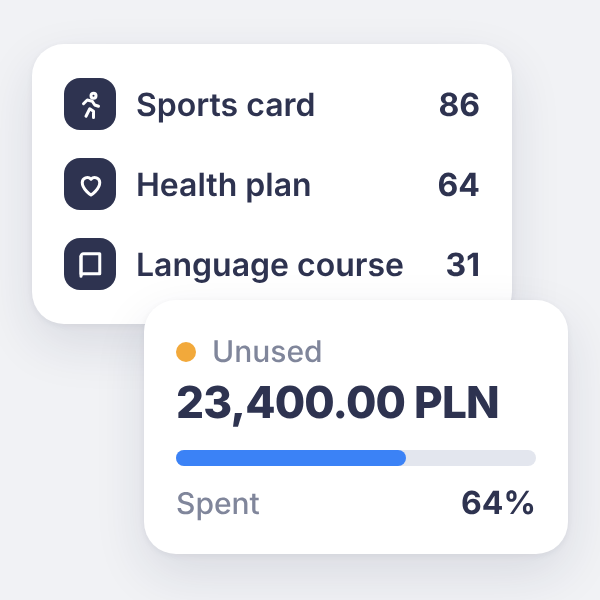
Benefit reports show how much employees spend, how much remains unused and which benefits attract the most interest. HR and finance plan the budget based on employees’ actual choices, not assumptions.

See it in a demo: A full picture of benefit spending
Ranking of recurring benefits (sports card, health plan, language course) and unused funds with the share spent

HR processes

Requests and absences workflow under control

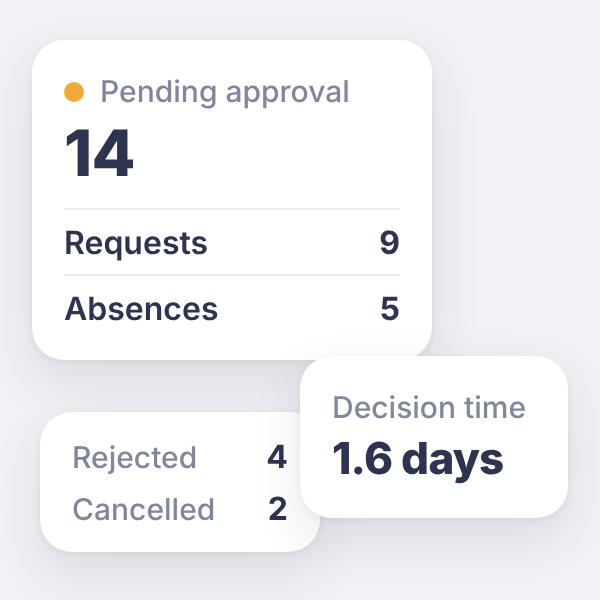
HR process analytics shows how many requests and absence submissions go for approval, how long they wait for a decision and which are most often rejected or cancelled. HR sees where the process slows down, without surveying managers.

See it in a demo: Requests and absences workflow under control
Requests and absences pending approval, rejected and cancelled requests, and average decision time

Employee activity

How employees use the platform

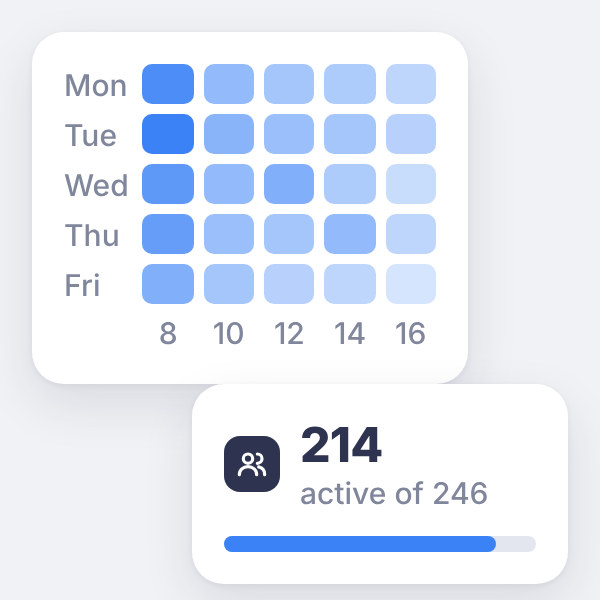
Activity reports show what share of the team uses Worksmile and at what times. This suggests when to publish important announcements and which areas of the platform are worth promoting more among employees.

See it in a demo: How employees use the platform
Heatmap of employee activity by weekday and hour, and the number of active users

AI Assistant in Analytics

AI summary and questions about data

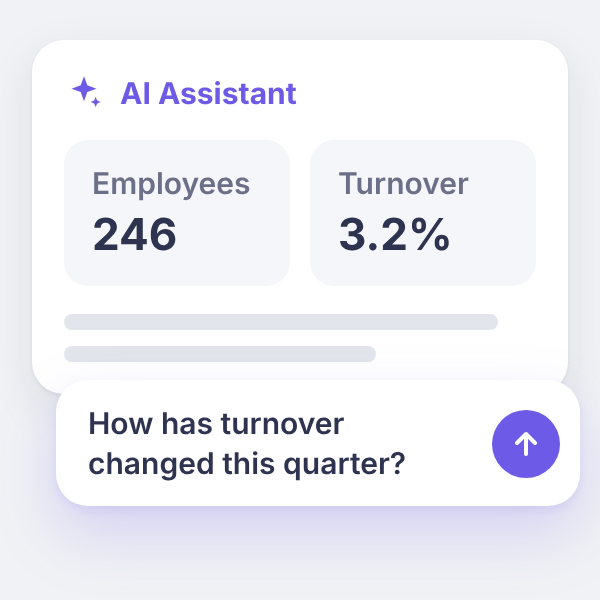
The AI summary helps read the dashboard and spot changes in the data at the organization level. You can also ask a question in natural language, e.g. “How has turnover changed this quarter?”, and get an answer based on metrics. HR prepares materials for the management board faster, without manually pulling data together from several systems.

See it in a demo: AI summary and questions about data
AI Assistant showing employees and turnover, with the question “How has turnover changed this quarter?”

How companies use our solution

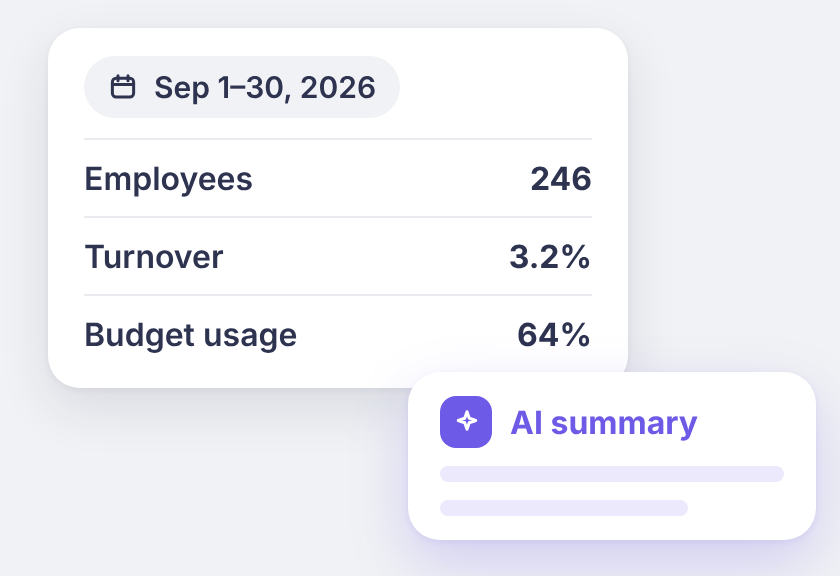
Key metrics for September 2026 – employees, turnover and budget usage – and the AI summary

Monthly report for the management board

The HR director sets the range to the previous month, reads the AI summary and reviews key metrics: headcount, attrition, budget utilisation and survey completion.

Result: a report based on platform data, without manually collecting it from several sources

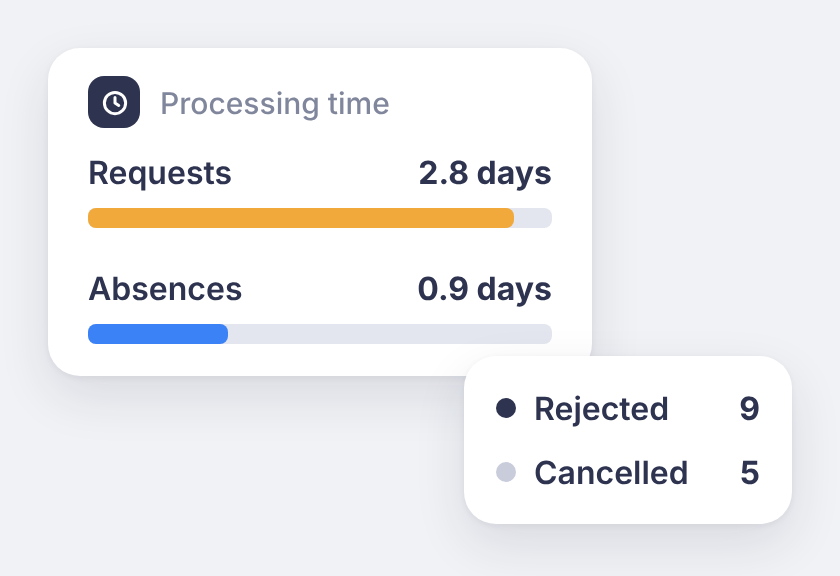
Processing time for requests and absences, and the number of rejected and cancelled requests

Diagnosing long approval times

Employees report long waits for decisions. HR compares processing times for requests and absences, checks rejected and cancelled requests and sees where the process slows down.

Result: a specific area to improve, without surveying managers

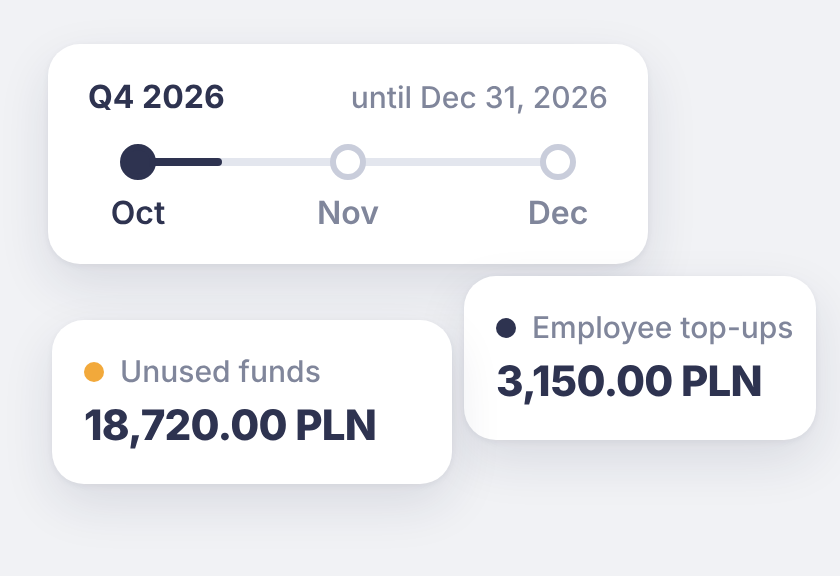
Q4 2026 timeline with unused funds and employee top-ups

Adjusting the budget before quarter-end

A benefits specialist checks employee spending and unused funds in budgets. Based on this, they plan a campaign reminding employees about available funds or change the budget amount.

Result: budget decisions based on how employees actually use it

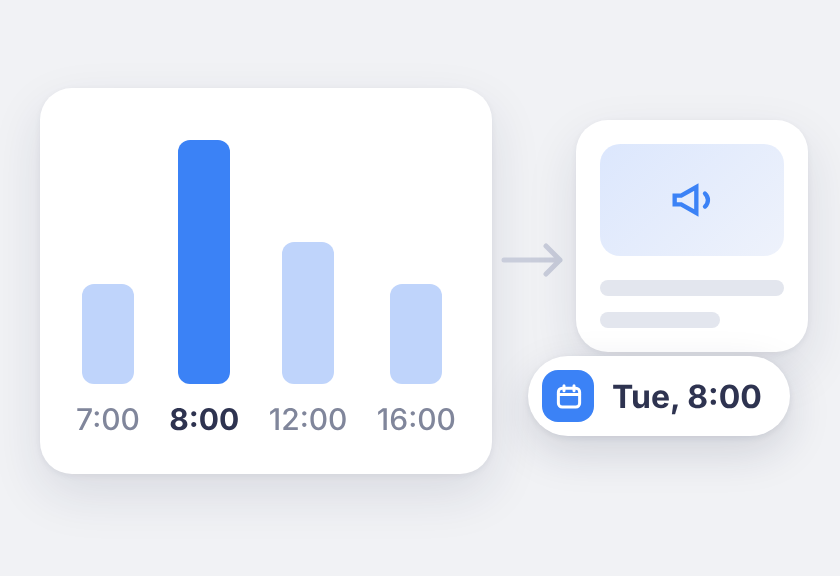
Activity chart by hour peaking at 8:00 and an announcement scheduled for Tue, 8:00

Publishing at peak activity

The internal communications team checks the heatmap of visit hours and schedules important announcements for when employees are most often on the platform.

Result: publication timing chosen on the basis of data, not intuition

Who is it for? For HR, the management board and finance

We support HR and team managers while caring for the experience of 100% of employees –⁠ across the entire employee lifecycle

HR:

ready-made data for conversations with the management board and early signals of change in teams –⁠ without manually putting reports together.

Management board:

the state of the organization without intermediaries –⁠ an AI summary and an answer to a question asked in your own words.

Finance:

a clear picture of the benefit budget –⁠ how much has been spent, how much is waiting in employees’ accounts and which benefits employees choose.

Trusted by over 360 clients and 200,000 employees

A platform people actually use, so HR projects deliver real results.

Click a customer logo with a case study to read the implementation story. All case studies →

Want to know more about our platform?

See the answers to the most frequently asked questions, and if you want to learn more, click the “Book a demo” button

How does Worksmile increase organizational efficiency?

Worksmile lets companies choose only the features they actually need and adapt them to their existing processes, instead of forcing the organization to work according to a rigid system. As a result, HR, communication and benefits processes become faster, simpler and more predictable.

The platform connects many areas horizontally –⁠ HR processes, internal communication and benefits management –⁠ consolidating them into one coherent tool. This eliminates tool chaos and data fragmentation, while also delivering financial savings.

  • HR and managers are genuinely relieved of operational work thanks to a single panel for working with the team and HR processes.

  • Employees no longer search for information in emails, files and several systems –⁠ everything they need is in Worksmile.

  • The management board and decision-makers gain consistent data on how the organization operates, enabling them to better assess performance and build forecasts that support business decisions in the years ahead.

The result: less manual work, fewer tools, less chaos –⁠ more control, speed and better decisions.

How does Worksmile support the HR department in operational work?

The HR Panel is the central place for managing the organizational structure, employment history, employee data, processes, documents, requests, communication, benefits and reports. HR gains one tool for end-to-end process control, which improves the quality of employee service, shortens turnaround times and reduces the risk of errors.

How does Worksmile support team managers in operational work?

The Manager Panel provides access to key team data, attendance, benefits data, requests, documents and processes. The manager gets one operational tool that increases their agency, speeds up decision-making, improves communication with the team and lets them lead it based on up-to-date data.

Is switching to Worksmile from another platform difficult?

No –⁠ migration follows a standardized process and is run by a dedicated team. Data, structures and history are transferred without disrupting the company’s work.

Does Worksmile integrate easily with our current tools?

Yes. A lightweight, well-documented API and ready-made integrations are available (SSO, HR and payroll systems, ATS, working time). The result: automatic data synchronization and elimination of manual work.

How does Worksmile ensure employee data security?

The platform uses data encryption, RBAC, audit logs and hosting in certified data centers, and is compliant with GDPR and ISO –⁠ minimizing legal and operational risks.

How is Worksmile different from an HR and payroll system?

HR and payroll systems are essential for settlements, payroll and formal and legal obligations. Worksmile operates one layer above –⁠ it supports the everyday work of HR, managers and employees, where organizational efficiency is actually created.

Worksmile:

  • organizes and automates HR processes (onboarding, offboarding, documents, consents, requests, surveys, performance reviews),

  • centralizes and streamlines internal communication,

  • manages employee benefits,

  • gives managers and HR one operational tool for working with the team,

  • provides consistent data and reports that support management decisions.

The HR and payroll system and Worksmile do not compete with each other –⁠ they complement each other.
Thanks to integration (API / SSO), data is synchronized and the company gains:

  • less manual work,

  • fewer errors,

  • better information flow,

  • greater process transparency.

The result: HR and payroll handle settlements, while Worksmile genuinely improves how the organization works day to day.

How does Worksmile help reduce the cost of multiple HR tools?

It replaces several separate systems with one ecosystem, lowering licensing, implementation and administrative costs.